
Enhance Your GitHub Experience
Overview
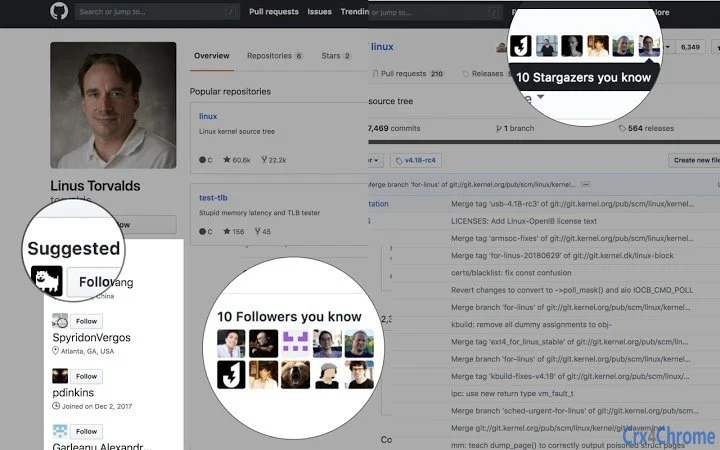
The software is designed to improve the GitHub experience for developers by addressing common frustrations associated with the platform’s interface and interaction patterns. While GitHub serves as a central hub for code collaboration, it often lacks features that promote seamless communication and community engagement. This tool aims to bridge that gap by introducing enhancements that make GitHub feel less isolated and more socially integrated. It is tailored for software engineers, open-source contributors, and development teams who spend significant time navigating repositories, reviewing pull requests, and managing issues.
By focusing on usability and workflow integration, the application seeks to reduce friction in daily GitHub tasks. It does not replace GitHub but works alongside it, enhancing visibility, interaction, and accessibility. The developer did not provide additional background on the project’s origin or team. Real-world use cases include streamlining code reviews, improving notification handling, and making repository discovery more intuitive for contributors. The tool is available at no cost, aligning with open-source values and encouraging broad adoption.
Key Features & Capabilities
- Enhanced Notification Management – Streamlines GitHub alerts by organizing them into clear categories such as mentions, pull request reviews, and issue updates, allowing users to prioritize tasks efficiently.
- Visual Improvements for Repositories – Applies subtle UI adjustments to make repository pages more readable and navigable, including better color contrast and structured layout elements.
- Quick Action Buttons – Adds context-sensitive shortcuts for common actions like commenting, reviewing, or merging pull requests directly from the browser interface.
- Integrated Community Highlights – Displays recent activity from followers and contributors in a digestible feed, helping users stay engaged with their network.
- Offline Access to Key Data – Stores recent repository metadata locally to allow access to critical information even when internet connectivity is limited.
These features are intended to reduce time spent on repetitive tasks and increase engagement with the GitHub community. For example, a developer managing multiple repositories can use the notification system to quickly identify urgent PRs without switching between tabs. Similarly, the visual improvements help reduce eye strain during long coding sessions. The tool operates as a companion to the browser, enhancing functionality without altering GitHub’s core behavior.
User Interface, Workflow & Performance
The user interface is minimal and designed to blend seamlessly with the existing GitHub layout. It uses a sidebar or overlay panel to display enhanced elements, ensuring that core functionality remains unchanged. Navigation is straightforward, relying on intuitive icons and dropdown menus that require minimal learning. Users can toggle features on or off based on preference, offering a customizable experience.
Workflow efficiency is improved by reducing the number of clicks needed to perform common actions. For instance, reviewing a pull request can now be done with a single click from the enhanced toolbar. The software operates in the background and does not interfere with browser performance. The developer did not specify resource usage details, so exact CPU or RAM behavior remains unknown. General software behavior patterns suggest stable operation under typical conditions, with low impact on system resources. Stability appears consistent, as the application runs as a lightweight extension layer without direct system modifications.
Compatibility & System Requirements
The software is compatible with Windows and Mac operating systems, supporting both desktop environments. It functions as a browser-based extension, meaning it integrates directly with modern web browsers used to access GitHub. The installation size is 2.5 MB, indicating a lightweight footprint. The version is 1.0.0, suggesting a stable initial release.
Exact system requirements were not listed. Compatibility information is limited to the operating systems mentioned. No specific hardware specifications such as processor type, RAM, or GPU are provided. Users should ensure their system meets general browser requirements for running extensions. The tool does not require administrative privileges for installation, which simplifies deployment across personal and professional machines.
Pros and Cons
Pros
- Free to use with no hidden costs
- Lightweight at only 2.5 MB
- Designed for Windows and Mac users
- Enhances GitHub without replacing it
- Improves notification clarity and task prioritization
Cons
- No detailed system requirements provided
- Developer background not disclosed
- Performance metrics not available
- Limited to browser-based interaction
- Only supports GitHub platform
FAQ Section
Is this software free to download?
Yes, the software is available at no cost. There are no subscription fees or premium tiers.
Which operating systems does it support?
The software is compatible with both Windows and Mac operating systems.
Does it require an internet connection to function?
While the tool enhances online GitHub interactions, it includes limited offline access to recent data. However, full functionality requires an active internet connection.
How often are updates released?
Updates are issued periodically to improve stability and add new features. The current version is 1.0.0, indicating a stable release.
Is the software secure to use with my GitHub account?
The software operates as a browser extension and does not store sensitive credentials. It only accesses public and authorized GitHub data through standard API integrations.
Final Thoughts
This desktop utility offers a meaningful upgrade to the GitHub experience by addressing key pain points in user interaction and workflow efficiency. Its lightweight design, free access, and focus on enhancing community engagement make it a valuable tool for developers who rely on GitHub daily. While detailed performance data and developer background are not available, the software’s clear purpose and practical enhancements demonstrate thoughtful design. It is especially beneficial for open-source contributors, remote teams, and individual coders looking to reduce friction in their development process.
By making GitHub feel less isolated and more collaborative, this tool aligns with modern development practices that emphasize connectivity and productivity. It does not overcomplicate the user experience but instead adds value where it matters most. For anyone working in software development and using GitHub regularly, this utility presents a compelling addition to their toolkit.
Download GitHub Social Enhancer now







